
Grandstream’s GSC3560 and GSC3565 Smart Outdoor Intercoms, along with the GDS3720 Series Door Stations, can be seamlessly integrated with Home Assistant for smarter homes and multi-dwelling unit (MDU) deployments.
Home Assistant is an open-source home automation platform that enables centralized control of connected smart devices. With features such as device management, automation capabilities, and flexible configuration options, it helps users build a secure, connected, and personalized smart living environment.
By integrating Grandstream intercoms and door stations with Home Assistant, users can create a unified smart ecosystem that improves access control, enhances security, and streamlines everyday operations.
Integrating GSC3560 and GDS3720 Series Devices with Home Assistant
Home Assistant can be integrated with Grandstream GSC3560 Series Smart Outdoor Intercoms and GDS3720 Series Door Stations through HACS (Home Assistant Community Store).
To begin, install both Home Assistant and HACS. Once installed, download and install the Grandstream Home Integration through HACS, then restart Home Assistant from the HACS dashboard.
After installation, configure the GSC356x and/or GDS372x device by following these steps:
- Access the Web UI of the GSC3560/GSC3565 or GDS3720 Series device and ensure that Home Assistant integration is enabled.
- Configure the username and password for the RTSP server.
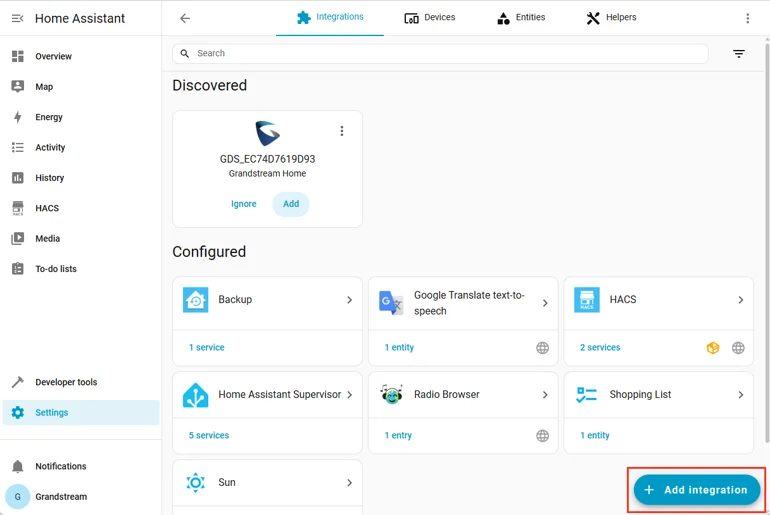
- Open Devices & Services in Home Assistant and add the Grandstream Home Integration.
- Select or add the required GSC or GDS device to Home Assistant.
Devices connected to the same network as Home Assistant are typically discovered automatically. If a device does not appear, it can be added manually through the integration settings.
For detailed setup instructions, refer to the GSC356x Technical Guide and GDS372x Technical Guide.
Capabilities of the Home Assistant Integration
The Home Assistant Integration enhances GSC3560/GSC3565 Smart Outdoor Intercoms and GDS3720 Series Door Stations by enabling centralized device management, local control, real-time alerts, and flexible automation settings.
Centralized Management and Local Control
Once integrated with Home Assistant, GSC3560/GSC3565 and GDS3720 devices can be managed directly from a single dashboard. This allows users to include their intercoms and door stations as part of a complete smart home or smart MDU ecosystem.
The integration also supports Home Assistant’s local control and privacy-focused environment, helping users manage devices securely within their own network. This adds greater control, improved privacy, and enhanced security to the overall deployment.
Automation and Alert Configuration
Home Assistant allows users to create customized automations and alerts based on access activity, time schedules, and specific device conditions.
Time-Based Alerts
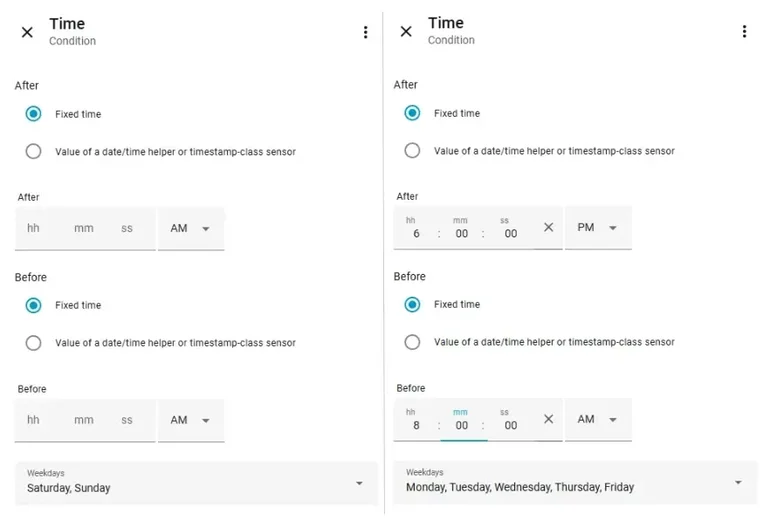
Users can define working hours or access schedules for supported GSC and GDS devices. If activity is detected outside the assigned time frame, Home Assistant can automatically trigger an alert through the dashboard.
For example, in a multi-dwelling unit (MDU) environment, users can configure late-night alerts to monitor unexpected access activity and help prevent break-ins or other security incidents. Alerts can be customized by device, time period, and event type, providing an additional layer of protection throughout the day and night.
Event-Based Automation
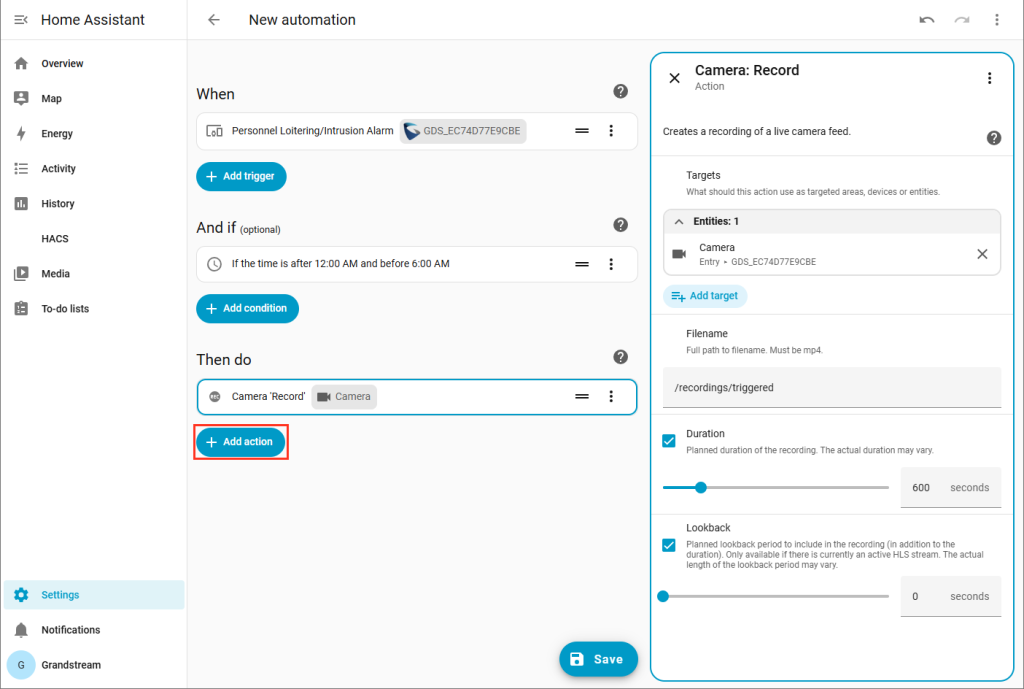
Home Assistant enables users to use pre-configured automations or create custom workflows based on specific events, conditions, and actions. Users can set triggers for events such as loitering or intrusion detection, high-temperature alerts, and keypad input errors. These triggers can be configured to operate before or after a defined time period, or at a specific date and time.
Once a trigger is activated, users can choose the required action. This may include sending notifications to a device, user, or Home Assistant dashboard, as well as starting video recording through Home Assistant. Recording duration can also be customized, with captured footage automatically saved within the system.
These event-based automation capabilities help users stay informed about activity around their GSC3560/GSC3565 and GDS3720 devices, supporting stronger security, faster response, and better protection for homes, communities, and MDU environments.
Integrating GSC3560/GSC3565 Smart Outdoor Intercoms and GDS3720 Series Door Stations with Home Assistant enhances deployment flexibility through centralized device management, local control, and advanced automation capabilities.
Users can benefit from Home Assistant’s privacy-focused environment while managing their devices from a single platform. Time-based alerts and event-driven automations help users stay informed about access activity, security events, and device conditions, even when they are away from the premises.
This integration adds an extra layer of security to homes and multi-dwelling unit environments, helping residents feel more protected in their living spaces. It also gives installers a flexible way to integrate Grandstream GSC and GDS devices into modern home automation ecosystems.
FAQs
1. Which Grandstream devices support Home Assistant integration?
Grandstream GSC3560 and GSC3565 Smart Outdoor Intercoms, along with GDS3720 Series Door Stations, can be integrated with Home Assistant for centralized monitoring, access control, alerts, and automation.
2. Do I need HACS to integrate Grandstream devices with Home Assistant?
Yes. Users need to install HACS (Home Assistant Community Store) and then download the Grandstream Home Integration to connect compatible GSC and GDS devices with Home Assistant.
3. Can Home Assistant send alerts for access or security events?
Yes. Users can configure time-based alerts and event-triggered notifications for activities such as intrusion detection, loitering alerts, keypad input errors, and access events.
4. Can I manage multiple Grandstream intercoms and door stations from one dashboard?
Yes. Home Assistant allows users to add and manage multiple compatible GSC and GDS devices from one centralized dashboard, making it suitable for homes, offices, and multi-dwelling unit deployments.